
Turn scattered emails
into organized
projects and
actionable tasks.
OfficeSyncPro connects your Outlook emails, meetings, and team collaboration into one workspace, so your team always knows what needs to happen next.
 Sign in with Microsoft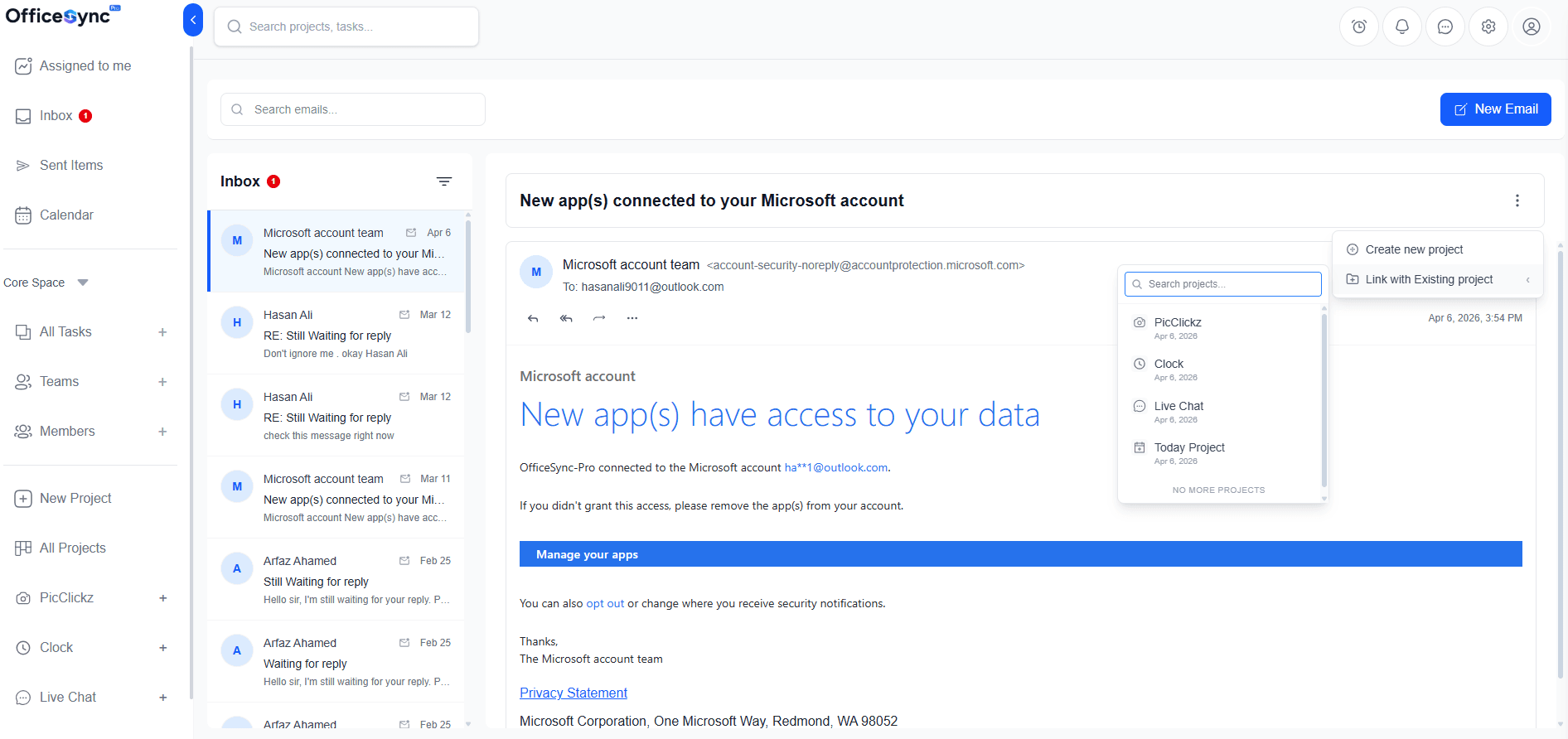
Work shouldn't disappear
inside your inbox.
Every team knows the feeling. An important email arrives, someone replies, a task is mentioned somewhere in the thread — and then more emails arrive, meetings happen, and suddenly no one remembers who was supposed to do what.
Re: Q2 Campaign — who's handling this?
We've been waiting on this for a week now..
Start testing Azure databases today
Build high-performance AI apps with Azure..
Status update?? — Urgent
Can someone tell me where we are on this..
Re: Re: Re: Re: Design Review
Ok so I think we agreed that Tom would ..
OfficeSyncPro turns this chaos into clear, trackable work.
From email conversation to completed
work in three simple steps.
1. Connect Outlook
Sign in securely with your Microsoft account and sync your emails and calendar instantly. No manual setup required.
2. Turn Emails Into Projects & Tasks
Convert email threads into projects, or transform any message into an actionable task with deadlines and assigned owners — in one click.
3. Track Progress with Your Team
Manage timelines, collaborate on tasks, and keep everyone aligned without leaving the workspace. No more status meetings.
One workspace for everything
your team commits to.
OfficeSyncPro brings your conversations, projects, and execution together so nothing falls through the cracks.
Turn entire email threads into structured projects
Stop losing important requests in your inbox. Convert any email thread into a full project — complete with discussions, tasks, and deliverables living together in one organized place.
- One-click email to project conversion
- Create new project or link to existing one
- Full email context preserved inside the project
- Team members see everything in real time
Convert any message into an actionable task instantly
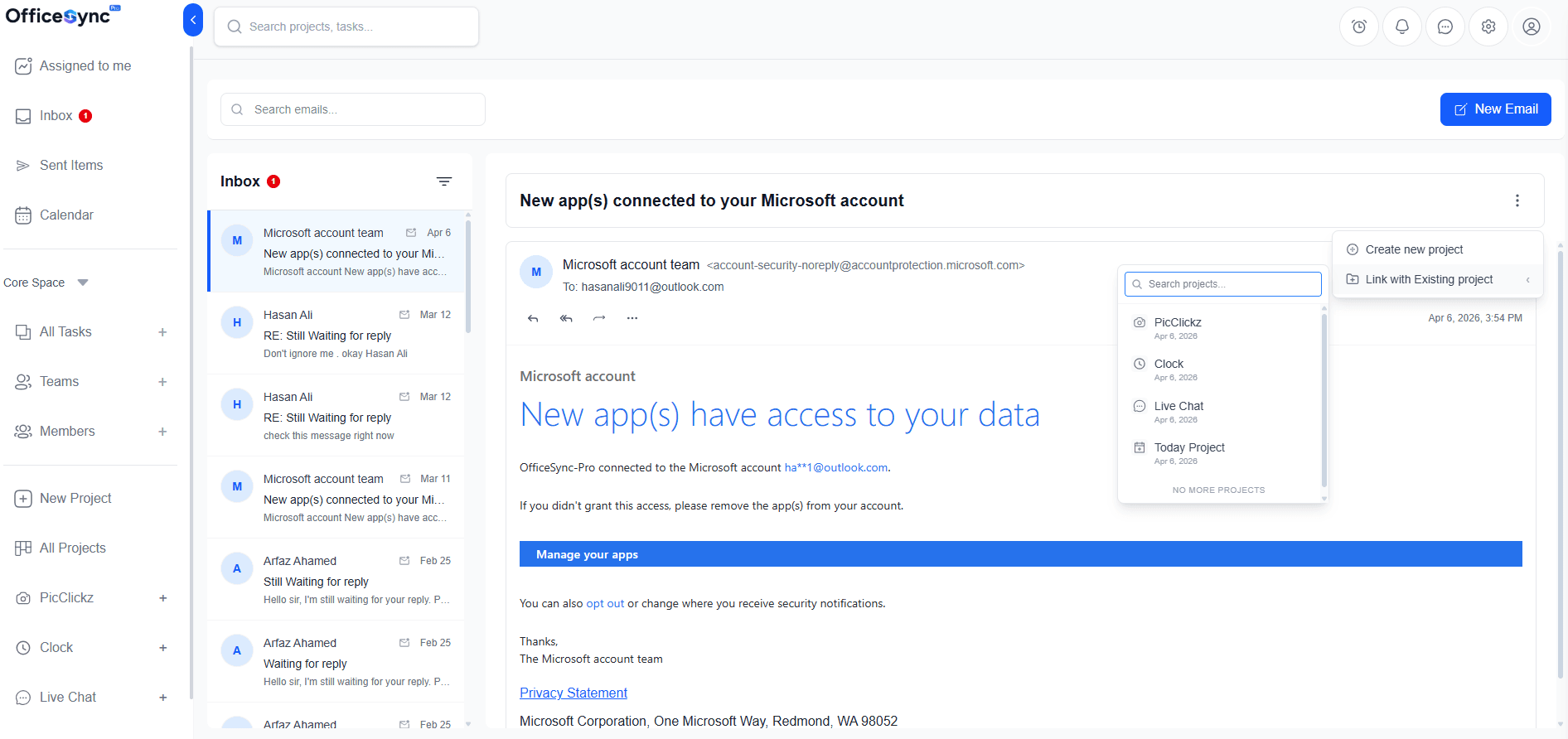
Don't let follow-ups disappear into email threads. Transform any email into a tracked task with an assignee, deadline, priority, and project link — without copying a single word.
- Assign tasks directly from your inbox
- Set deadlines, priorities, and owners
- Link tasks to existing projects seamlessly
- Track progress without switching tools
Meetings stay connected to the work they belong to
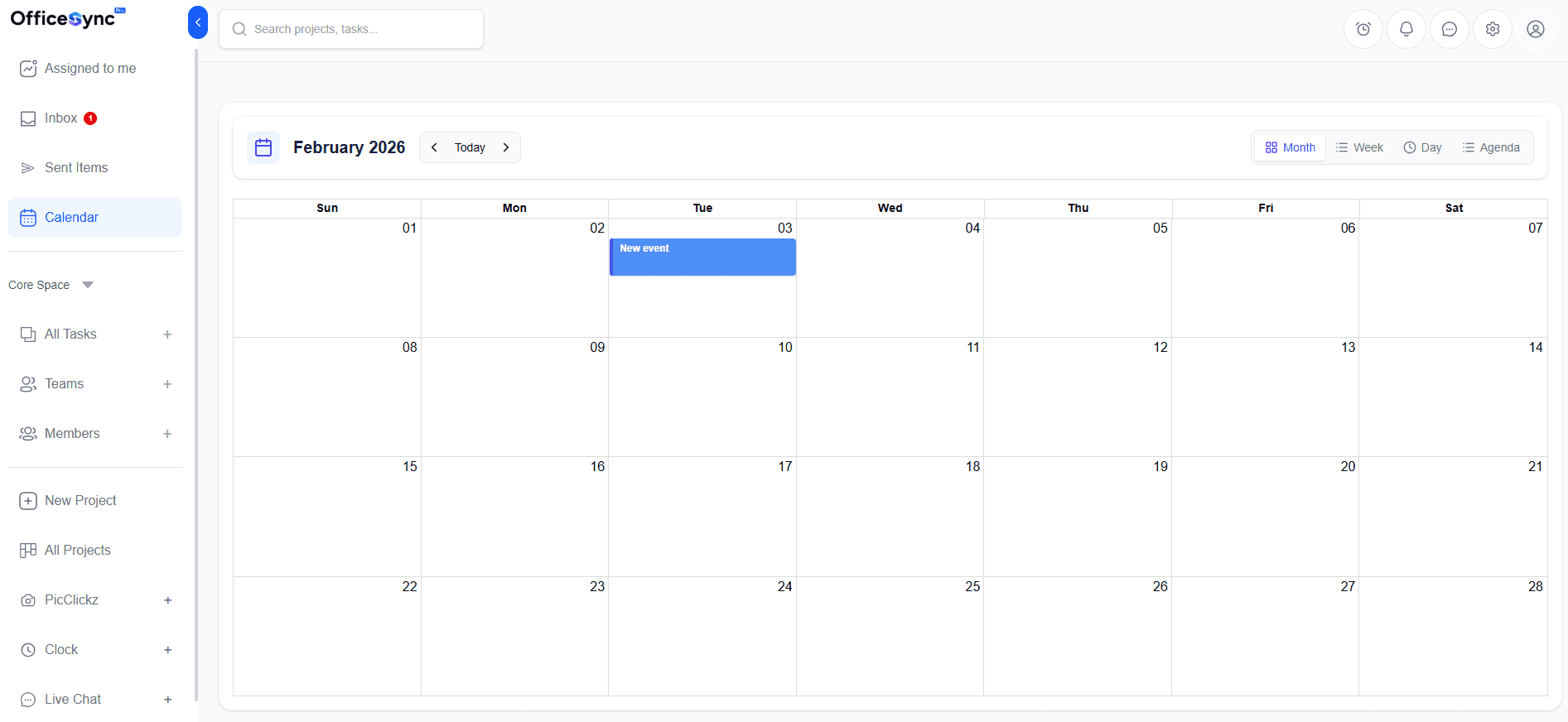
OfficeSyncPro syncs directly with your Outlook Calendar, so every meeting, deadline, and project milestone stays connected. View and manage calendar events right inside the app — no context switching needed.
- Two-way Outlook Calendar sync
- View tasks and meetings in Month / Week / Day / Agenda
- Calendar project tasks appear inside Outlook automatically
- Full context around every discussion and decision
See the entire story of your work
in one place.
From inbox chaos to completed projects — everything is connected, visible, and under control.
Bring structure to email chaos
Instead of endless inbox threads, connect emails to projects and turn conversations into trackable progress. Every thread has a home.
Manage projects with complete visibility
View project activity, updates, tasks, attachments, and meetings from a single workspace. Nothing is hidden, nothing is lost.
Break work into clear tasks
Create tasks and subtasks, assign owners, set priorities, and keep responsibilities visible across your entire team.
Plan timelines with confidence
Use Kanban boards or Gantt views to monitor progress and keep deadlines under control before they become blockers.
Conversations stay
connected to the work.
Chat with teammates, mention colleagues, and share updates directly inside projects and tasks. Instead of searching across emails, chats, and documents, everything stays organized where it belongs.
- Comment and collaborate directly on tasks
- Mention teammates with @mention
- Share updates inside projects — not email
- Full conversation history tied to every task
Just converted that client email into a task — assigned to @Sarah with Friday deadline ✓
Got it! I can see all the original email context inside the task. Super helpful✨
Timeline updated — linked it to the Gantt view. Everyone should be able to see progress now.
@Jamie can you add the attachments from the meeting? Want everything in one place.
Stay on top of work without
checking five different tools.
OfficeSyncPro keeps your team informed the moment anything changes. Your team sees what matters the moment it happens.
Task assigned to you
Just nowJamie M. assigned you 'Review Q2 campaign copy' · Project: Marketing
Project update
2m agoWebsite Launch moved to 72% complete · 3 tasks remaining
Meeting event linked
15m agoQ3 Planning standup connected to Project: Strategy 2026
Mention and reply
1hr ago@Alex K. replied to your comment in 'Client Proposal Draft'
Built for startups and remote
teams that move fast.
Modern teams don't work in one office, one timezone, or one tool. OfficeSyncPro keeps everyone aligned by connecting conversations with structure.
Clear project visibility
Everyone knows what's happening and what comes next. No more 'what's the status?' conversations.
Accountability without micromanagement
Tasks and responsibilities stay transparent. Who owns what is never a question.
Less tool switching
Email, tasks, projects, and meetings live in one place. Stop losing work across five different apps.
Conversations connected to work
Discuss tasks and share updates attached directly to the projects they belong to.
Real-time awareness
Notifications for task assignments, project updates, meeting events, and mentions — the moment they happen.
Better follow-through
Commitments made in email finally become real work. Nothing gets forgotten in a thread ever again.
Built on secure Microsoft
authentication.
OfficeSyncPro integrates directly with Microsoft Identity and Outlook, ensuring secure authentication and reliable data protection. Each organization workspace is isolated and controlled through role-based permissions. Your team's information stays safe and organized.
Microsoft Identity Integration
Sign in with your existing Microsoft account — no separate password needed
Isolated Organization Workspaces
Your data is completely separate from other organizations
Role-Based Permissions
Control who sees what across every project and team
No Installation Required
Sign in with Outlook and get started immediately
Simple pricing that grows with you
Start free, with no card and no trial countdown. Switch between monthly and yearly below — paying yearly saves you 15%.
Free
FREEFree forever
- 3 team members
- 1 project
- 50 tasks
- 1 GB storage
- No guest access
- Gantt charts
- 90-day history
Pro
PRO$102 billed yearly · save 15%
- 10 team members
- 10 projects
- 500 tasks
- 5 GB storage
- 10 guests (1 per project)
- Gantt charts
- Advanced search
Business
BUSINESS$255 billed yearly · save 15%
- Unlimited team members
- Unlimited projects
- Unlimited tasks
- 5 GB storage
- Unlimited guests
- Gantt charts
- Advanced search
Enterprise
ADVANCENegotiated pricing
- Unlimited team members
- Unlimited projects
- Unlimited tasks
- Unlimited storage
- Unlimited guests
- Gantt charts
- Advanced search
Frequently Asked Questions
Everything you need to know about optimizing your team's productivity with OfficeSyncPro.
OfficeSyncPro connects securely with your Outlook account and synchronizes your emails and calendar events. You can turn email threads into projects, convert messages into tasks, and track work across your team — all without leaving one unified workspace.
Yes. Any email can be converted into a task with an assignee, deadline, priority, and project link. The original email context is preserved so nothing gets lost in translation.
OfficeSyncPro is designed specifically for startups and distributed teams that rely heavily on email communication and need a structured way to manage projects and tasks across timezones.
No installation is required. Simply sign in with your Microsoft account and start organizing your work immediately. OfficeSyncPro runs entirely in the browser.
The free plan gives you full access to core features including email-to-task conversion, project management, and Outlook sync for small teams. Upgrade when you need more projects, members, or advanced features.
Stop letting important work
disappear inside email.
Bring your emails, tasks, meetings, and projects together in one organized workspace your team can actually rely on. Sign in with Outlook and get started in minutes.